01
Connect Gmail and Shopify
Two minutes to connect. Regards Kim keeps Gmail as your support inbox, sorts incoming customer emails, and filters out the messages that do not need a reply.
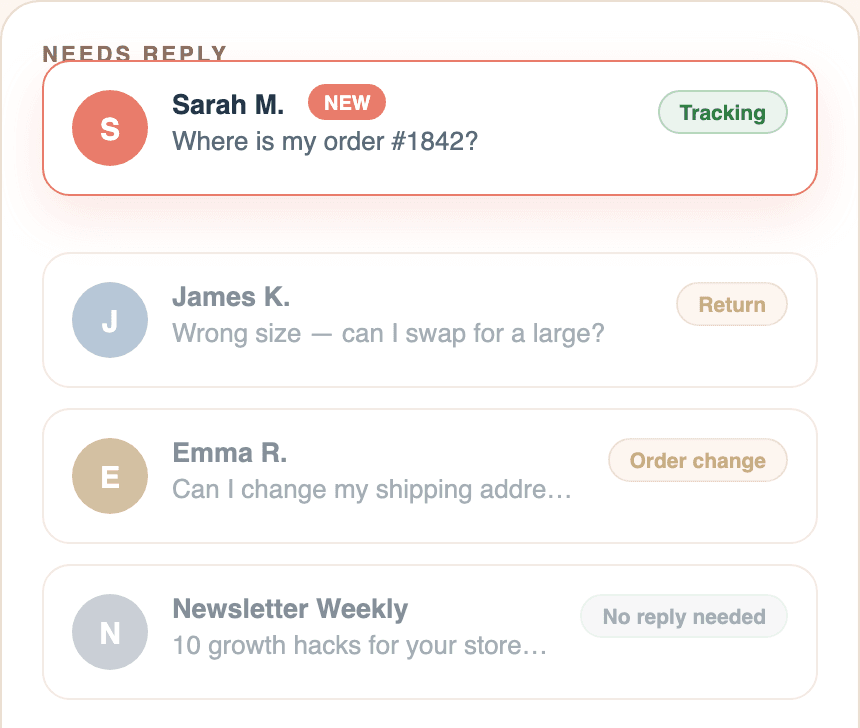
Regards Kim connects Shopify and Gmail, matches customer emails to real orders, and auto-drafts replies you can review, edit, and send. Built for tracking questions, returns, refunds, exchanges, cancellations, and order updates.
How Regards Kim answers with Shopify context
Two minutes to connect. Regards Kim keeps Gmail as your support inbox, sorts incoming customer emails, and filters out the messages that do not need a reply.
Order, delivery status, tracking links, policy links, and customer details sit beside the conversation. No more copying between Gmail, Shopify, and tracking pages.
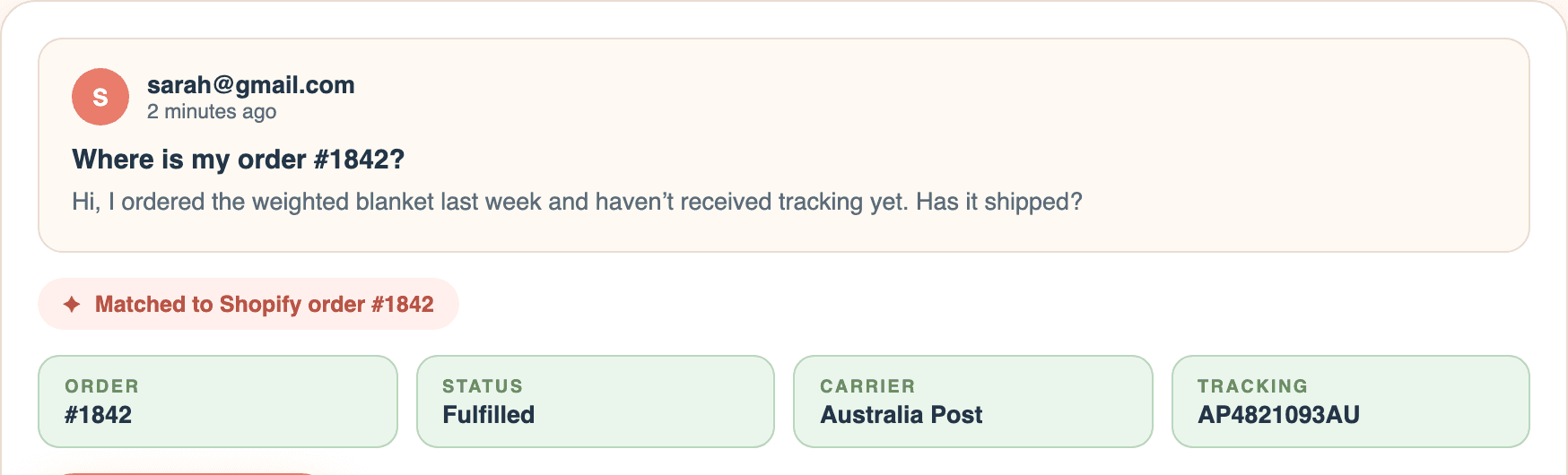
As support emails come in, Regards Kim prepares Shopify-aware replies from the real order, tracking, policies, and saved replies. You review, edit, and send from Gmail.
See the difference
Same customer question. Very different source of truth.
Customer email
"Hi, just checking on order #4721 — the tracking link hasn't updated in three days. Has it actually shipped?"
Hi there, thanks for reaching out. I'm sorry for the confusion. Shipping updates can sometimes take a little longer than expected. Please keep an eye on your tracking link, and if it still doesn't update soon, contact the shipping carrier or reply here for further help.
Hey Sarah, thanks for checking in.
I looked up order #4721 — it was dispatched from our warehouse on March 29 via Australia Post. Tracking is currently showing "label created", which means the carrier hasn't scanned it yet. This usually updates within 24-48 hours, but three days is longer than expected.
I'll keep an eye on it from our side — if it hasn't moved by tomorrow afternoon, I'll follow up with the carrier directly and let you know.
View tracking →Kind regards,
Kim
Early merchants
“We were spending hours every week digging through Gmail, Shopify orders, tracking pages and customer notes just to answer simple questions. Regards Kim pulls everything together and gives us a draft reply that's usually 90% there. It's cut our support workload dramatically without taking control away from our team.”
“As a founder handling customer support myself, Regards Kim feels like having a support assistant sitting beside me. It quickly shows which emails actually need attention and saves me from constantly jumping between Shopify and Gmail. The time savings add up fast.”
“We tested a few AI support tools and most wanted to automate replies completely. That wasn't something we were comfortable with. Regards Kim keeps us in control while doing all the heavy lifting behind the scenes. We reply faster, miss fewer emails and still know every message has been reviewed by a real person.”
Multilingual support
When a customer writes in another language, Regards Kim detects it and drafts the reply in that language for you to review, edit, and approve.
The app interface is available in English, German, Spanish, French, Dutch, Danish, Swedish, Portuguese (Brazil), and Chinese (Simplified).
Support looks free when it hides inside founder hours. It is not.
$500+/mo
Five hours a week of founder time on tracking lookups and copy-paste replies — the most expensive support agent your store will ever have.
$800+/mo
Roughly 20 hours a week at typical VA rates — plus hiring, training, management, and time-zone gaps. Worth it eventually, but a big step while support is still mostly repetitive email.
$49/mo
Gmail stays in place, Shopify context sits beside every email, and you still approve every send.
Trust first
Regards Kim is designed for Shopify merchants who want faster email replies without handing customer conversations to an unsupervised bot or migrating into a helpdesk.
Drafts are prepared for review. A human chooses what gets sent from Gmail.
Replies are grounded in the customer email, Shopify order details, tracking, and your policies.
Regards Kim uses customer communication data to run your support workflow, not to sell data or train general AI models.
The workflow keeps order facts, policy links, and human approval close to every customer reply.
Want the data details before installing?
Read the plain-language overview of Gmail access, Shopify permissions, AI use, and what Regards Kim does and does not do with customer communications.
Read Security & Data
A note from the founder
“I ran ecommerce stores for ten years. The best support person I ever worked with inspired Regards Kim: calm, clear, and able to turn an angry customer into a loyal one in two sentences. Regards Kim exists so every store owner gets that kind of support help.”
Matt · Founder, Regards Kim
Read the whole story →Regards Kim is for stores that need faster post-purchase replies, not a full helpdesk rollout. Keep Gmail, work from Shopify context, and approve every reply.
Regards Kim
Billed monthly through your Shopify account
The expensive part of support is not the reply box. It is finding the order, checking tracking, remembering the policy, deciding what matters, and writing a clear customer response.
Regards Kim removes that repeated searching and rewriting without forcing you into a helpdesk. Your existing Gmail workflow stays in place, and your team keeps control of every message that leaves the inbox.
For a busy founder or small team, one saved hour a month is enough to justify the plan.
Start with a 7-day free trial. Keep it only if it makes support lighter.
Getting Started
Start by installing RegardsKim from the Shopify App Store, then connect Gmail and confirm your store policies so every draft has the right Shopify context.
Regards Kim connects Shopify and Gmail, matches customer emails to real orders, and auto-drafts Shopify-aware replies you can review, edit, and send faster.
No. You keep the final say of what leaves your inbox. Regards Kim helps organise the work, surface the right context, auto-draft or improve replies, and speed up sending from Gmail.
No. It assists the person handling support. Regards Kim gathers Shopify context, sorts the inbox, and prepares AI drafts automatically so founders, VAs, or support teams can reply faster with better information.
No. Regards Kim is for Shopify merchants who want faster support email replies without moving into a full helpdesk. It does not replace team ticketing, live chat, social inboxes, or phone support.
Regards Kim is built around human approval and customer-data minimisation. It uses the email and Shopify context needed to help with support, but it does not send customer replies without you and does not sell customer communication data.
You review every draft before it is sent. If the wording is not right, edit it, improve it, use a saved reply, or write your own response. The product is designed to speed up support, not remove judgment.
No. Regards Kim is built for Shopify merchants who already use Gmail for support. The goal is to keep your existing inbox workflow while adding Shopify context, triage, and automatic drafting help.
It helps with tracking questions, returns, refunds, exchanges, cancellations, order changes, shipping address issues, product questions, complaints, and messages that need no reply.
No. Regards Kim works behind the scenes with your support email and Shopify admin, not as a chat bubble on your storefront.
Nope. You can change the sign-off name in your settings so replies go out under your brand or team name.
So the AI helper has the right guardrails. Your return window, shipping timeframes, exchange rules, and policy links help Regards Kim keep replies accurate instead of guessing.
There is one plan: $49 per month, billed through Shopify. If it saves one support hour a month, it has likely paid for itself.
Shopify stores that have outgrown a messy Gmail inbox but do not want a full helpdesk yet. If support is stealing founder or operator time, Regards Kim is for you.
Install free. If the first week does not make Shopify support emails faster to answer, walk away — no card, no lock-in.
Install free on ShopifyKind regards, Kim